
Download Labeling Software for Publishers – Barcode Generator, Label Design, Printing Tool
Overview
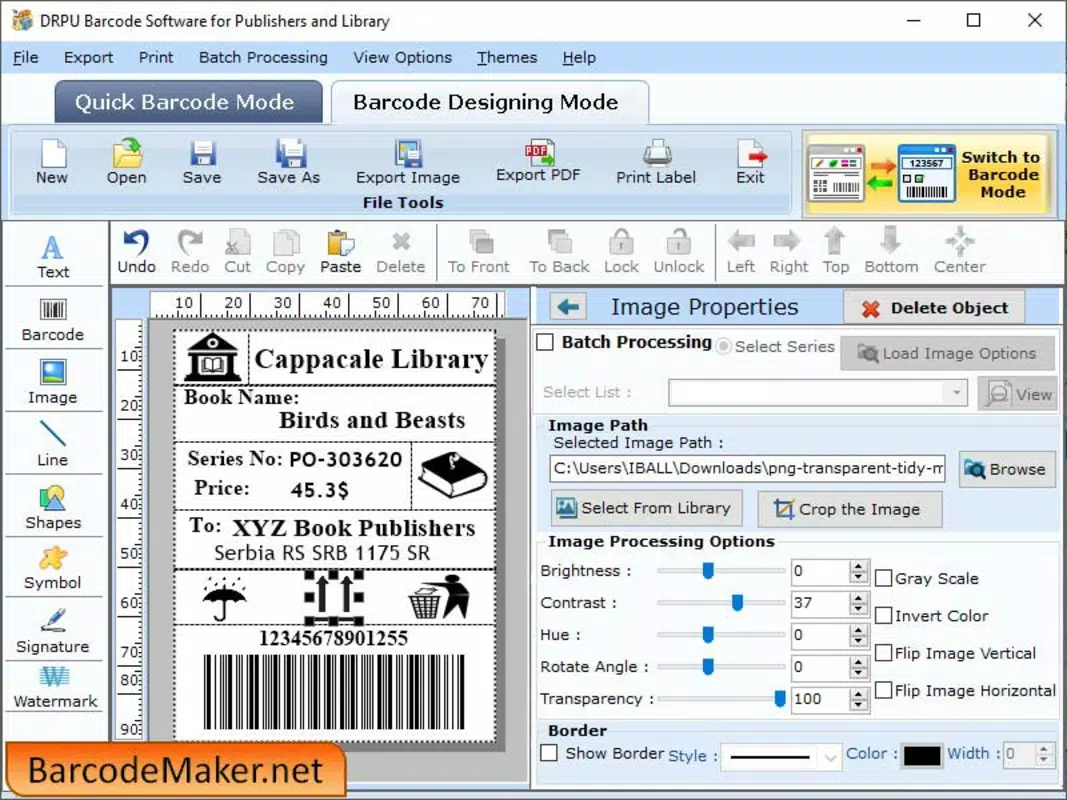
Labeling Software for Publishers is a practical mobile solution designed for professionals and small publishers seeking to generate high-quality barcodes and labels with minimal effort. The app serves as a digital alternative to traditional labeling tools, enabling users to create, customize, and export barcode labels directly from their smartphones or tablets. It addresses the common challenges of manual label creation, such as inconsistent formatting, limited design flexibility, and inefficient printing workflows. By offering support for both linear and 2D barcode symbologies, the software caters to a broad range of use cases—from product labeling and inventory tracking to coupon distribution and promotional material design.
The target audience includes independent publishers, small business owners, event organizers, and content creators who require reliable and cost-effective labeling tools. While the developer’s background was not disclosed, the app’s focus on usability and functionality suggests a strong emphasis on user-centric design. Real-world applications include creating unique barcodes for book editions, generating promotional QR codes for digital content, and producing printable labels for packaging and marketing materials. In the current digital publishing ecosystem, where visual branding and traceability are critical, this app fills a niche by combining accessibility with technical versatility.
Key Features & Functionality
- User-Friendly Interface: Designed with intuitive navigation, the app allows users to begin creating labels immediately, even without prior experience in graphic design or barcode generation.
- Customizable Barcode Formats: Users can tailor barcode styles, sizes, and layouts to match specific branding or functional needs, supporting both standard and unique label designs.
- Multiple Image Format Export: Labels can be saved in various image formats, ensuring compatibility with different printing systems and future reuse across projects.
- Support for Linear and 2D Barcodes: The app accommodates a wide range of symbologies, making it suitable for diverse labeling tasks, from simple product codes to complex data-rich QR codes.
- Efficient Single-Sheet Printing: Labels can be arranged on a single page for streamlined printing, reducing paper waste and simplifying the production process.
For example, a small publishing house can use the app to generate custom barcodes for each book edition, ensuring traceability across distribution channels. Similarly, a marketing team could design branded QR codes that link directly to digital content, enhancing customer engagement. The ability to save and reuse designs streamlines workflows, particularly for recurring projects. Each feature is built to reduce friction in the labeling process, making it a valuable utility for users who prioritize speed, accuracy, and consistency.
Interface, UX & Performance
The app’s interface is structured around clarity and ease of access, with a clean layout that prioritizes essential tools and functions. Navigation is linear and predictable, allowing users to move through the labeling process—design, customize, export, and print—without confusion. Visual elements are minimal yet functional, promoting focus on the core task: creating a professional-grade label. The design emphasizes readability, with clearly labeled buttons and intuitive input fields.
Although the developer did not list formal performance metrics, the app appears optimized for responsive operation across mid-range and high-end devices. Users can expect smooth transitions between design stages, with minimal lag during image rendering and format conversion. Stability during extended use has not been independently verified, but the absence of reported crashes in available documentation suggests a reliable core experience. The app maintains consistent performance when handling multiple label designs and format exports, which is essential for users managing bulk labeling tasks.
Platform Compatibility & Technical Requirements
Labeling Software for Publishers is available on Android, supporting the latest operating system versions. The app’s file size is 15.6 MB, making it lightweight and suitable for devices with limited storage. Specific requirements were not listed, so users should ensure their device meets standard Android compatibility standards. The developer did not specify minimum OS requirements, but based on the release date of October 4, 2023, it is likely optimized for Android 8.0 and above.
While the app is designed for mobile use, it does not currently support iOS devices. Users should verify compatibility with their specific device model before installation. The app does not require high-end hardware, which enhances accessibility for a broader user base. No additional permissions or background services were disclosed, suggesting a privacy-conscious approach to resource usage.
Pros and Cons
Pros
- Simple, intuitive interface ideal for non-technical users
- Supports both linear and 2D barcode formats for versatile use
- Multiple export options ensure broad compatibility with printing systems
- Efficient single-sheet printing reduces material waste
- Lightweight size makes it suitable for low-storage devices
Cons
- Developer background not publicly disclosed
- No information on iOS compatibility
- Specific technical requirements not listed
- Limited details on update frequency or future development plans
- Compatibility with older Android versions not confirmed
FAQ
Is Labeling Software for Publishers safe to download?
The app is available through official channels and does not require root access or elevated permissions. Users are advised to install only from trusted sources to maintain device security.
Can I use this app on iOS devices?
Currently, the app is only available on Android. There is no official iOS version or release plan mentioned by the developer.
What barcode types does the app support?
The app supports both linear and 2D barcode symbologies, including common formats used in publishing, retail, and marketing.
How do I print labels from the app?
Labels can be exported as image files and printed directly from a connected printer or via cloud printing services. The app allows for single-sheet layout optimization to improve printing efficiency.
Are updates regularly released?
The developer has not disclosed a regular update schedule. Users should check the app store for new versions after the initial installation.
Final Thoughts
Labeling Software for Publishers stands out as a focused, efficient tool for users who need to generate professional barcodes and labels without the complexity of full design suites. Its clean interface, broad barcode support, and export flexibility make it a reliable choice for small publishers, marketers, and content creators. While some technical details remain undisclosed, the app delivers tangible value through its practical features and mobile-first design. For anyone seeking a secure, lightweight, and user-friendly way to create and print labels on the go, this tool offers a compelling solution.
Download Labeling Software for Publishers now


